The Smart Cleaning / Rotational File System
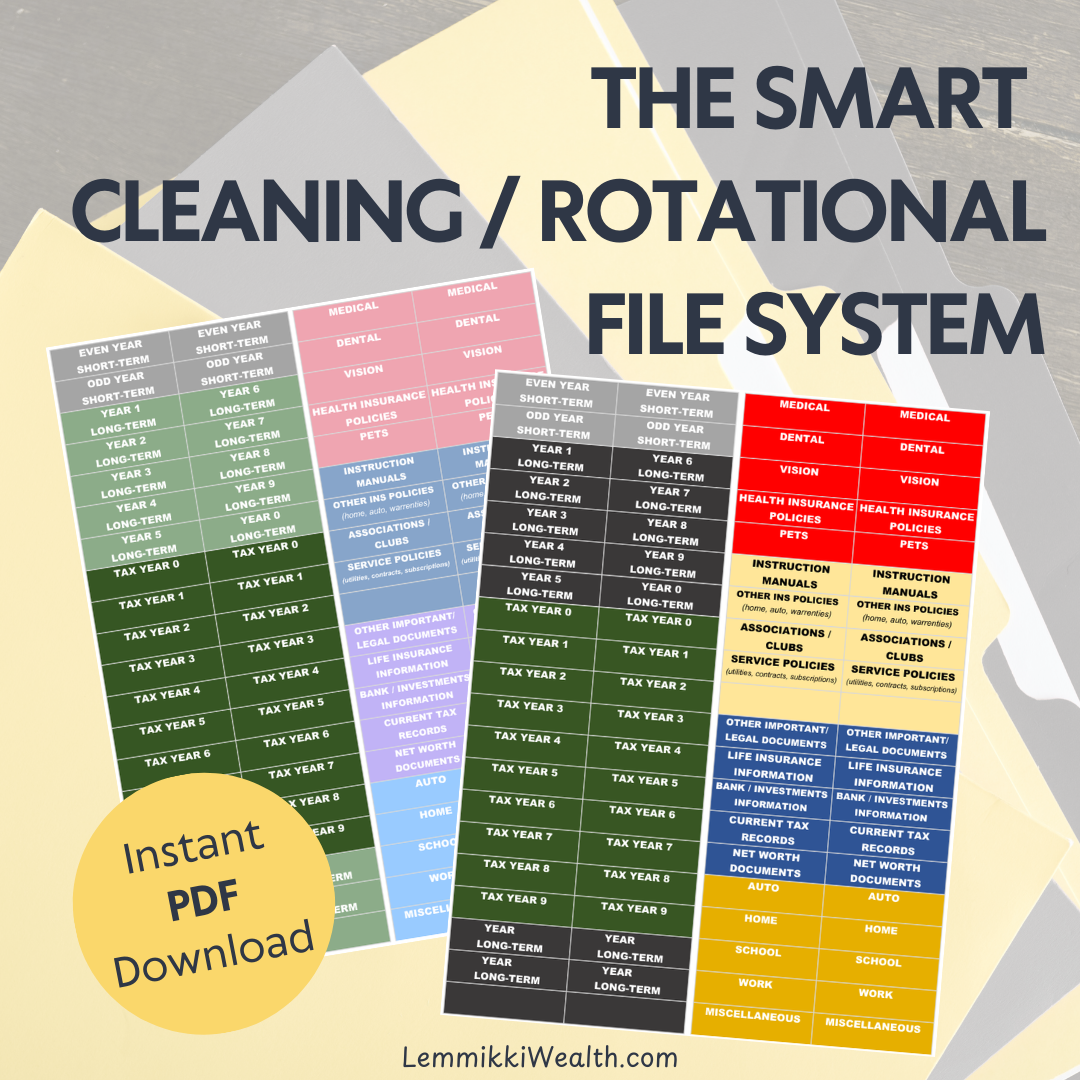
The first time I heard about this type of filing system was when I discovered the FreedomFiler, and it truly changed my life. I’ve always been drawn to organization systems that categorize things down to the tiniest detail, but I eventually realized that’s just not my personal organizing style.
When a system becomes too detailed and requires extra time or brainpower to maintain, I tend to procrastinate, and that’s when papers and clutter start piling up. On top of that, I was tired of having to sort through every folder and every piece of paper each year to decide what could be discarded. Sometimes I would put it off for a couple of years, which only led to an overwhelming stack of paperwork.
That’s why I was excited to learn that there’s a way to create a self-purging filing system. I knew I needed that, and it has truly been a game-changer for me. This is something I’ve tweaked for myself over the years. The FreedomFiler can still get pretty detailed, and I've learned that's not necessarily something I need. So, if you’re like me and need something super simple that creates an easy, self-cleaning, or self-purging file system, check out this Smart Cleaning/Rotational File System.
Instructions are below, and if you’re interested in my file tabs, check out my PDF Printables.
The “You’re an Adult Now” Starter Pack - Mom Is Not Your Filing Cabinet 😂
As I mentioned in my previous post, when my son started working, he would drop all the paperwork he received onto my desk. He was unsure what to do with the papers, and most of them just needed to be filed. So, when he turned 18, I created a file system just for him. I got teased for it, as many asked if I was trying to push him out of the house, but this wasn't about rushing him out. It was about teaching him how to organize his own papers and responsibilities. Plus, it freed up my desk!
Now that my daughter is approaching 18 and preparing to graduate, I’ve begun building a file system for her. I hope this can be something that grows with them and that they can tweak as they go, building a system that works just for them.
Smart Cleaning/Rotational File System Instructions:
Even Year and Odd Year Folders
These folders are for documents that only need to be kept for one year. Rotate them annually. When a new year begins, empty the folder that matches the new year. If the year ends in an even number, empty the Even Year folder. If the year ends in an odd number, empty the Odd Year Folder. This system allows you to quickly discard outdated documents and make space for the new year’s paperwork.
Example: For 2026, empty the 2024 documents from the even-year folder(s), so it's ready for 2026 documents.
Example Documents: most receipts, utility statements, phone and internet statements, credit card statements, and bank statements.
*Tip: This can be divided into 12 even-year and 12 odd-year folders, one for each month, but for me, having just one folder for the even years and one for the odd years works just as well. Especially since most of our receipts and statements are online now.
Five‑Year Folders
These are for documents that need to be kept for longer than one year but no more than five years. At the beginning of each new year, remove any documents that have reached the five-year mark. This keeps the folder current and ready for new documents.
Example: If Year 1 has documents from 2025, then when 2030 comes around, empty all the 2025 documents from the Year 1 folder to make space for 2030 documents.
Example Documents: major purchase receipts (appliances, electronics, furniture, tools, and anything with a multi-year warranty, etc).
*Tip: Place a sticky note on or inside the folder labeled with the current year for quick reference when reviewing what to remove later. If it’s more convenient, you could also create 10 folders for this section using the same method as the Tax Year folders (listed below), where each number represents the final digit of the year. This may be a little much, as you probably won’t need to keep many of these papers for more than 5 years, but it may be easier to know what year is in each folder. Do what is best for your organizing style.
Tax Year 0–9 Folders
These folders organize tax documents by the last digit of the tax year. Each number (0–9) represents the final digit of the year.
Example: 2024 documents go in the "Tax Year 4" folder, 2025 documents go in "Tax Year 5", and so on. At the start of each new year, remove and shred any documents in that folder that are now ten years old. (In 2026, remove documents dated 2016 from the Tax Year 6 folder so it is ready for 2026 tax paperwork.) This keeps your tax records easy to locate, simple to rotate, and consistently up to date.
The Other Folders
These folders are for documents that must be kept for more than 5 years or for records you may need to access more quickly.
*Tip: You can place individual non-hanging file folders inside these main hanging folders to separate specific document types or years.
Separated Document Type examples: If you have multiple vehicles, create a separate non-hanging file folder for each vehicle within the main Auto records folder, or use separate non-hanging file folders for each family member within the Medical, Dental, and Vision folders to keep records clearly organized.
Separated Year example: You may also add non-hanging folders labeled “Year 1,” “Year 2,” etc., within a main category, such as Service Policies, Associations/Clubs, or anything you feel this may be helpful for. This functions similarly to the Five-Year rotating system but allows you to more easily locate and remove documents from a specific year when they become outdated or expired.
In the end, organizing shouldn’t feel overwhelming or complicated. It should work with your habits, not against them. This system has given me a simple, low-maintenance way to stay on top of paperwork without the yearly dread of sorting through piles. It’s flexible enough to grow with you, easy enough to maintain, and practical enough to actually stick with. Whether you’re setting up your own system or creating one for your newly “official” adult, the goal is the same: less clutter, less stress, and a filing system that practically cleans itself.
Let me know what you think, and what works for you.